


For the second time, members of the various QA teams from Bedrock (TVJS, Hypercare, Mobile, BO) were able to attend the Paris Test Conf, a day of conferences on software quality and testing.
Program:
- Exploring the non-deterministic world (Vincent Dauce)
- Quality documentation for operational software (Graveaud Geoffrey)
- Pretotyping & prototyping: testing to decrease risk (Noémie M. Rivière)
- How to test the accessibility of a website? (Emmanuelle Aboaf)
- Stop the triangles and quadrants, build a real test pyramid (Christophe Breheret-Girardin)
- Experience feedback on the creation of a test laboratory - a mix of career change and disability (Solène Lapouge - Aurelia Ribeira)
- Working with chatGPT & Co: what is the impact on the mental health of testers? (Anne Kramer)
- The instability of our tests prevents us from delivering (Sofia Lescano Carroll)
- Software testing in healthcare, a (slightly) different world (Julien Beaudaux - Valentin Besse)
- Faster Better Stronger: how to unlock continuous performance testing? (Matthieu Leroux-Huet)
- Security can also “Shift Left” (Xavier Maso)
- User-Centric QA, a test approach that listens to users (Camille Fournier)
- Tests: these saboteurs of agility (Natacha Fourmy)
- Implementing integration tests on a React app: performance, learning and limitations (Joris Langlois)
- From incident to excellence: the role of post-mortems in quality (Benoît Maggi)
- Workshop - Lego, best practices and fun (Cécile Especel)
- Workshop - Bugs and botany: the presentation where you are the hero (Marc Hage Chahine / Julien Cahu)
- Workshop - Mobile screen reader accessibility testing (Antonio Ferreira)
Quality documentation for operational software (Graveaud Geoffrey)
Introduction
Presented by Geoffrey Graveaud, this conference revolves around knowledge management: Agile states “Operational software over comprehensive documentation,” while DevOps, though born from agile thinking, advocates for “Quality documentation for operational software.”
Understanding the stakes of quality documentation
Exploring the problem of SPOK (Single Point Of Knowledge)
Discovering the essential criteria for quality documentation
Knowledge management is a key issue in business management.
A company’s employees are its neurons, and when they go home, only databases and documentation remain. This becomes strategic since when these neurons are no longer there (departures, absences, etc.), we lose small crumbs of organizational knowledge. The SPOK is often one and the same person, who is:
- Autonomous
- A Swiss army knife
- Very often called on in case of problems
A SPOK is also often a SPOC: Single Point Of Contact. This is the person who knows who to contact in case of problems.
So what happens when this person is absent?
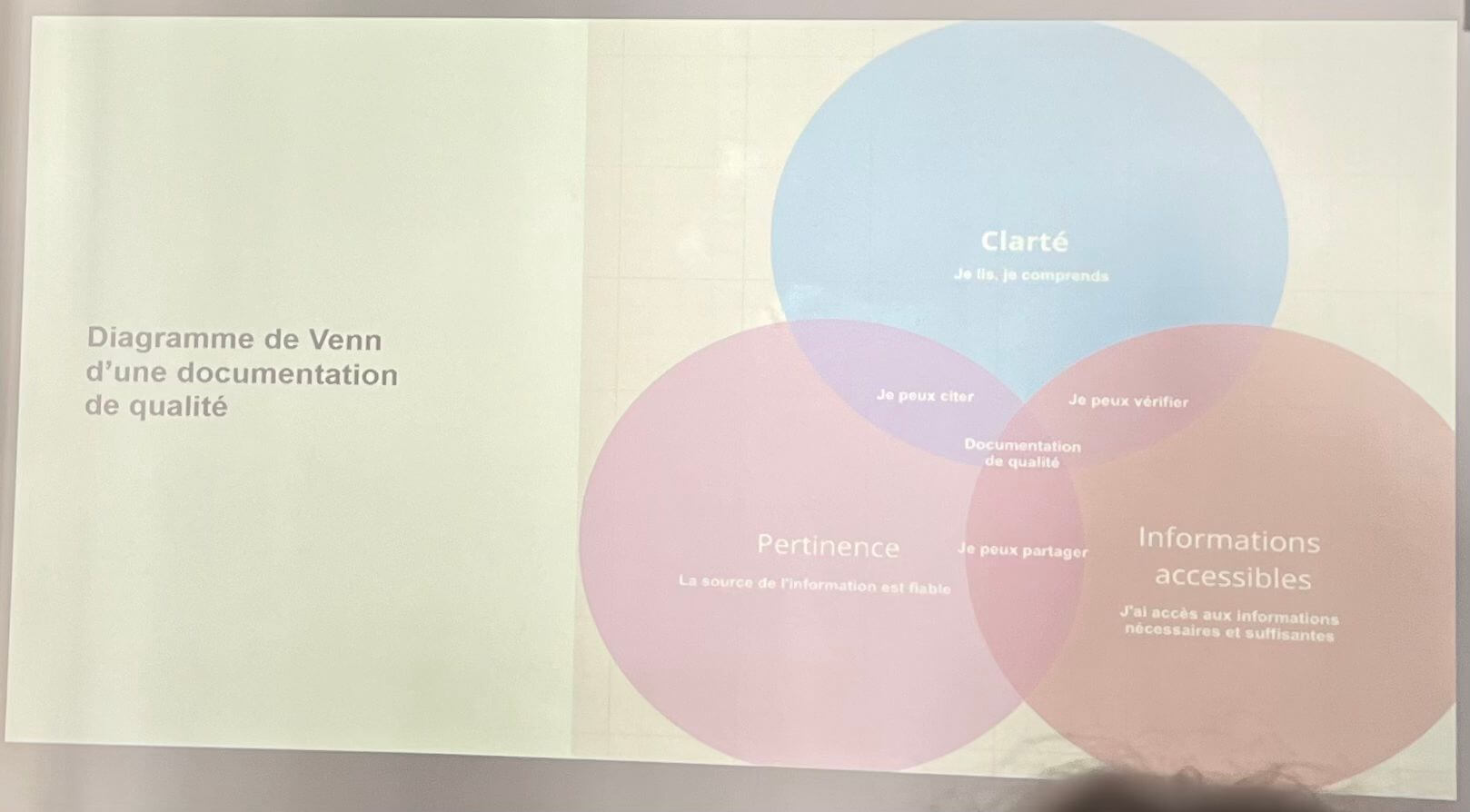
3 criteria for quality documentation:
Clear: Each sentence, each word must be clear to the majority of readers.
Relevant: Each statement must be referenced in order to verify the relevance of the proposal.
Easy to find information: we must be able to easily find information on a particular subject from the document. Links to sources must be provided.
Clarity (I read, I understand) + relevance (the source of the information is reliable) = I can quote.
Clarity + accessible information (I have access to the necessary and sufficient information) = I can verify.
Relevance + accessible information = I can share.
Clarity + Relevance + Accessible Information = Quality Documentation
Implementation of these 3 criteria
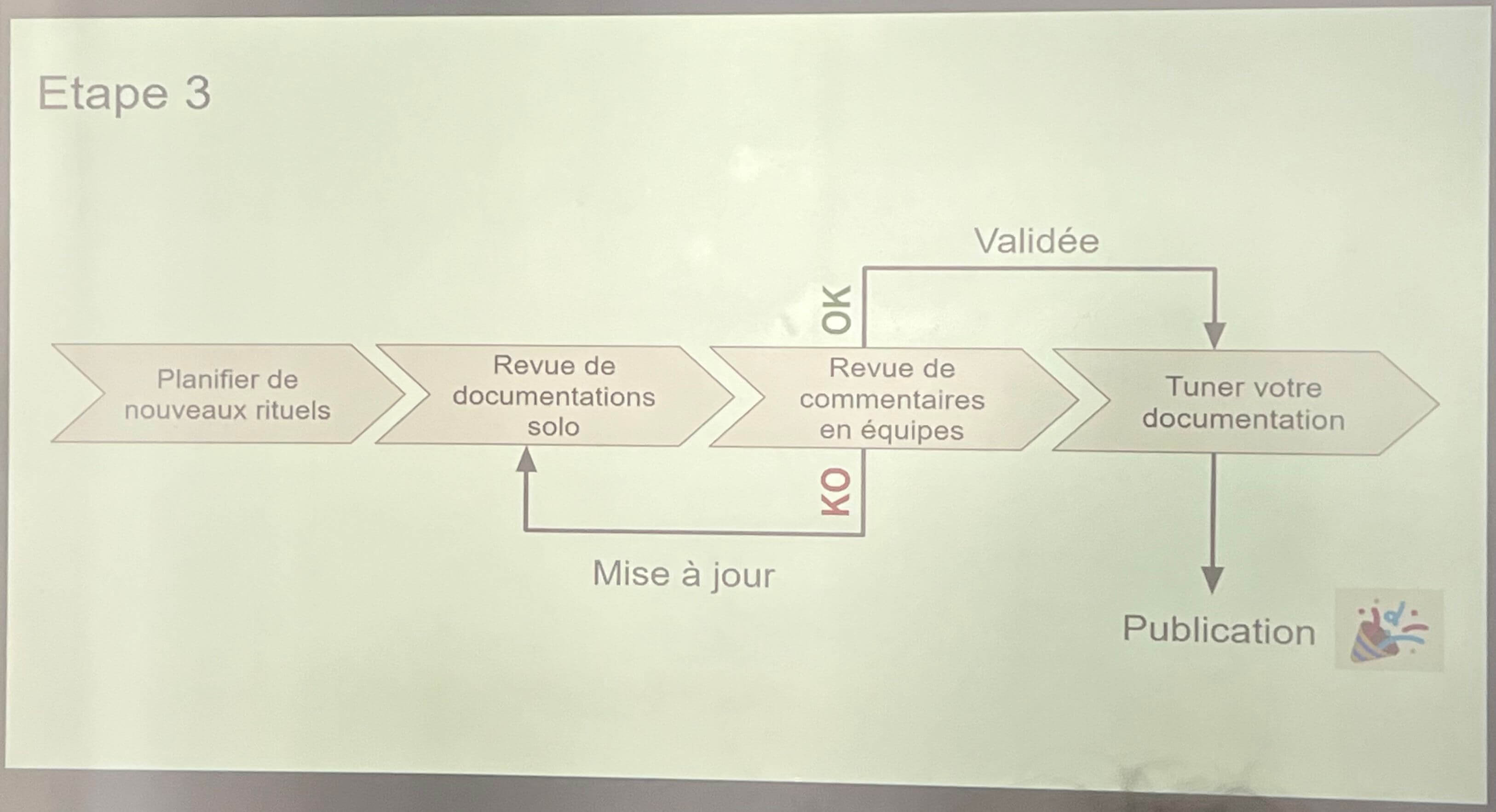
Example of a simple and SAFE-TO-FAIL process:
Plan new rituals > Solo documentation review > Team comment review
If the team comment review is KO, then we update the documentation, and we go back to the process.
If the team comment review is OK, we don’t publish it right away, we refine it.
Solo documentation review:
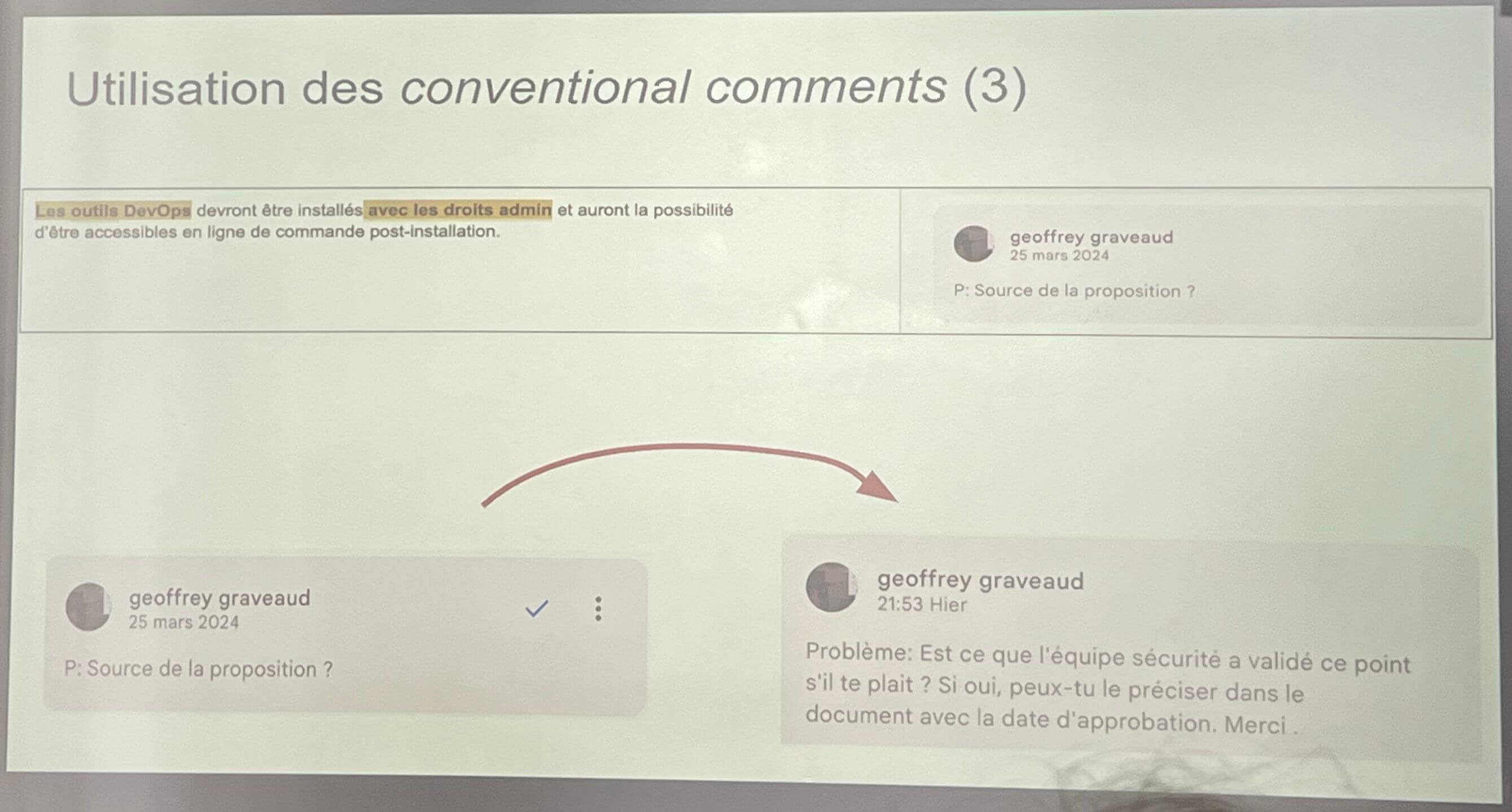
Comment cleverly by adding P and/or I and/or C at the beginning of a comment:
- P = Show Relevance
- I = Need access to the source and missing Information
- C = Lack of Clarity
Use conventional comments:
- Problem
- Praise
- Remark
- Question
Team comment review:
- Gather comments by theme in a support document
- Be factual, like reading a feedback report
Interests of the comment review:
- Vocabulary alignment
- Understanding alignment
- Feeling of subject appropriation
- Strategic distribution of certain information
- Consistency on the discourse held in the company
Why tune your documentation?
That is to say, how to make it visible, how to make it easy to find, how to indicate that this documentation exists?
- Indicate who wrote it, which team, + a contact email
- Structure the document (readability, summary)
- Use links
- Use tags / labels
- Test access to the document via the integrated search engine
- Identify informative duplicates, then try to create links between documentations or merge them.
- Inform people likely to be interested (Slack, etc.)
A limit? Documentation is an emerging part of knowledge.
- We know more than we can say,
- We say more than we can write
- We cannot therefore limit the knowledge of an organization to documentation
Dave Snowden - Knowledge management specialist
Conclusion
Who is right? Agile or DevOps?
It depends on the context
Test and experiment with SAFE-TO-FAIL approaches
Adapt approaches based on results.
Pretotyping & prototyping: testing to decrease risk (Noémie M. Rivière)
Introduction
This talk aims to highlight the value of doing user testing early in the conception process, with the help of pretotyping and prototyping. The target audience for this talk is more Product than Quality Assurance, but it sheds light on some basic introductory user research concepts. It relies heavily on the book ‘The Right It’ by Alberto Savoia.
Key takeaways
Most New Products Fail
- The majority of new products and startups fail, not because they are poorly executed but because they are the wrong product - meaning there is little or no market demand for them.
Pretotyping: Fail Fast, Fail Cheap
- Instead of spending months or years building a product, you should test demand through pretotyping, by creating quick, low-cost experiments to see if people would actually use or buy it.
The Law of Market Failure
- Even good ideas often fail because they don’t find a market. This makes it crucial to test assumptions before fully committing.
Pretotyping Techniques
- The Pinocchio – Create a non-functional version of the product to gauge interest (e.g., a fake app interface).
- The One-Night Stand – Set up a short-term trial to see if people actually use the product.
- The Fake Door – Show a product offer online and see if people click, before even building it.
- The Mechanical Turk – Fake automation by manually providing a service before automating it.
Measuring Success with The Innovation Meter
- Instead of relying on gut feelings, measure actual interest using real-world data (e.g., sign-ups, purchase intent, engagement).
Commitment Over Opinions
- People saying “That’s a great idea!” means nothing. What matters is if they show real commitment (e.g., pre-orders, sign-ups, paying money).
Conclusion
The talk emphasises that the key to success is testing demand before investing heavily. Instead of asking, “Can we build this?” ask, “Should we build this?” and validate with real-world experiments.
The key difference between pretotyping and prototyping is their purpose and level of development:
- Pretotyping consists of testing the Idea’s Demand (before building)
- Prototypin consists of testing the Product’s Feasibility (after deciding to build)
Recommendations
- There seems to be an unanimous agreement on the need to involve QA earlier in the process, during the Discovery phase
How to test the accessibility of a website? (Emmanuelle Aboaf)
Introduction
According to the Observatory of Accessibility Obligations Compliance, only 5% of websites are accessible to people with disabilities. In this conference, Emmanuelle Aboaf shares with us the 6 most common accessibility errors on a website through the use of a keyboard and a screen reader, and presents simple tips to implement in HTML and a bit of CSS.
When should digital accessibility be taken into account?
From the very beginning of the project! Accessibility is not integrated at the end of the project because each page where accessibility is lacking will have to be redone, so it costs more to do it at the end.
Digital accessibility concerns not only websites, but also intranet sites, extranet sites, and mobile applications.
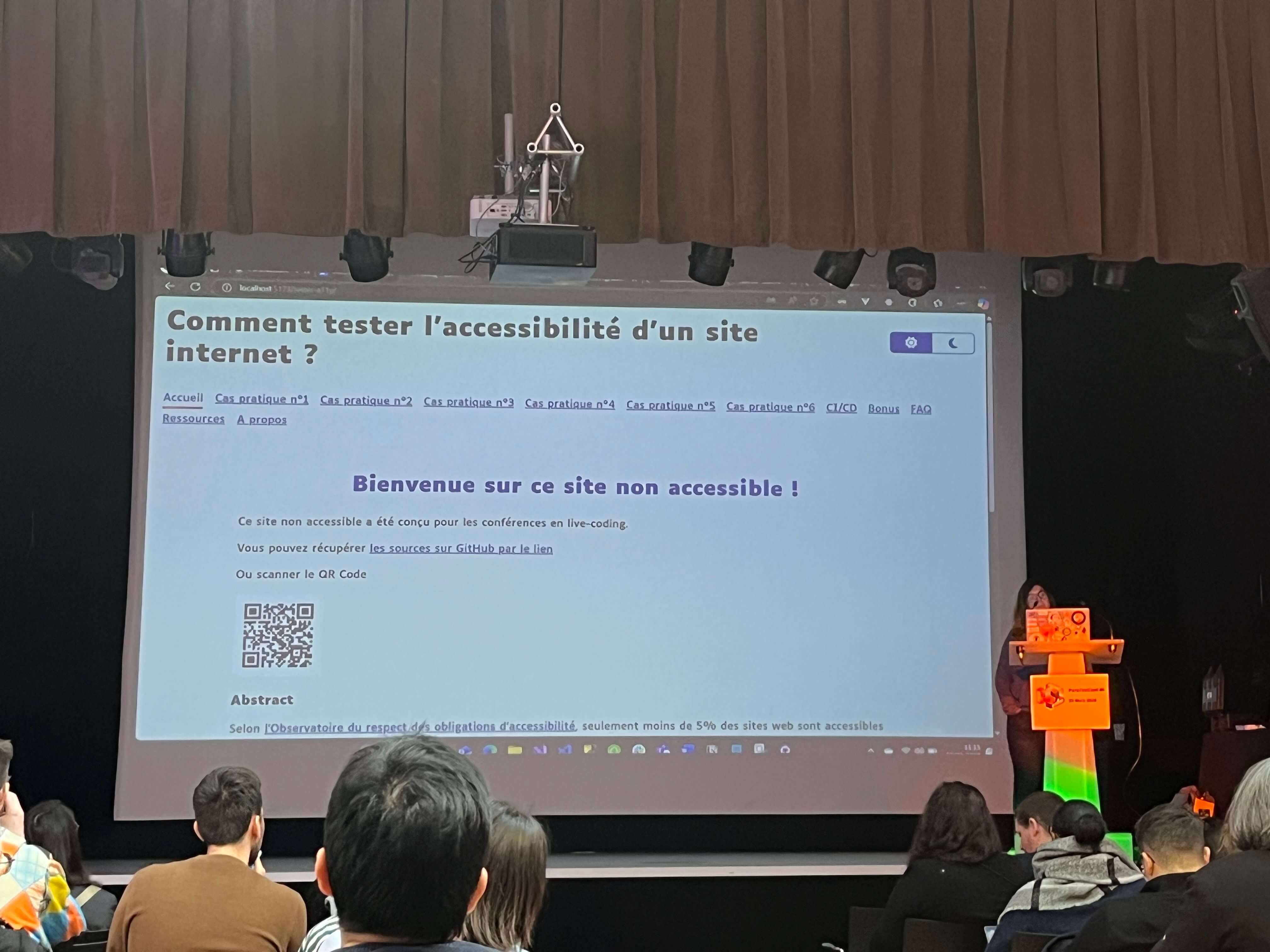
Some CSS and HTML tags can make web pages more inaccessible, especially for users with disabilities (e.g., screen reader users, keyboard users, low-vision users). Here are some common offenders:
display: none;orvisibility: hidden;- Problem: Hides elements from both sighted users and screen readers, making essential content unreachable.
- Better Alternative: Use
aria-hidden="true"for purely decorative elements.
overflow: hidden;(without scroll alternatives)- Problem: Can trap keyboard users or prevent scrolling.
- Better Alternative: Ensure content remains keyboard-accessible and consider adding focusable elements.
- removing Focus Indicators (
outline: none;)- Problem: Makes keyboard navigation difficult for users who rely on the
Tabkey. - Better Alternative: Use
outline: auto;or a custom focus style like:button:focus { outline: 2px solid blue; }
- Problem: Makes keyboard navigation difficult for users who rely on the
<iframe>Without Titles- Problem: Screen readers don’t know what the iframe content is about.
- Better Alternative: Always add a
titleattribute:
<iframe src="example.html" title="Video Player"></iframe>
Case 1: Contrasts
For visually impaired individuals, poor contrast can make a web page difficult to read, or even unreadable.
According to RG2A rules, the minimum contrast should be 4.5:1 for “regular” text, and 3:1 for large text.
To find the correct contrasts between two colors and obtain a ratio, use Tanaguru Contrast-Finder .
Case 2: Language
Using the NVDA speech viewer allows us to realize that it’s necessary to define the language of a page if we don’t want a page written in French to be read by the viewer in English: we end up with an incomprehensible accent.
To do this, it’s sufficient to define the language in the style file, using the <html lang="en"> tag.
Case 3: Images
Without the alt attribute, it’s impossible for a visually impaired person to know what the image is about because the screen reader will skip the image. Therefore, this attribute must always be used to describe the image as best as possible.
<img src="photo.jpg" alt="A scenic mountain view">
Case 4: Forms
In the case of forms, the NVDA speech viewer encounters several problems when inputs are not correctly configured:
- Reading labels: add the
forattribute to the label to allow it to be read by the viewer. - Errors: add the
aria-describedbyattribute to allow the speech viewer to read error footnotes. - Required fields: add the `required attribute when a field is mandatory so that it is restituted by the screen reader.
- Color: do not display error/validity information for a field only by color. Icons, footnotes, etc., can be added.
Case 5: Buttons
In the case of a button containing a label, or a button containing an image, it is important to use the title or aria-label attributes on the button tags so that the speech viewer can correctly transcribe what the button designates.
Case 6: Links
- Explicit links via aria-label attributes.
- Clearly distinguish a link and a button: A button performs an action, a link redirects.
ARIA bonus:
- The
aria-currentattribute allows vocalizing the current page. - The
aria-liveattribute allows vocalizing information from the moment the element’s value changes. - The
aria-hiddenattribute allows hiding the element from screen readers because icons are not rendered correctly. To complement the icon, put a span with the .sr-only class and the label. - The
aria-pressedattribute on the button allows vocalizing whether it is pressed or not.
Some accessibility verification tools for automated tests:
- AccessLint : a Github application that finds accessibility errors on PRs
- axe Linter - GitHub Marketplace : which also finds accessibility errors on Github PRs
- Accessibility testing - Playwright : for automated tests with Playwright
Useful links:
- RGAA criteria: Référentiel général d’amélioration de l’accessibilité - RGAA
- Dev Memo: Accessibilité numérique - DesignGouv
- Development and RGAA: Make your site accessible to all
Stop the triangles and quadrants, build a real test pyramid (Christophe Breheret-Girardin)
Introduction
The objective of this conference was to enrich the classic 2D test pyramid by integrating the specificities of test quadrants. This innovative approach allows for a more complete and strategic vision of software quality, taking into account the various dimensions of testing.
The Four Sides of the Pyramid
Side 1: Construction Tests (Development Focused)
This first side concerns tests carried out primarily by developers. It encompasses:
- Static tests (code analysis),
- Unit tests,
- Integration tests,
- Component tests.
The role of QAs here is to provide support, as developers’ expertise is paramount.
Side 2: Product Guarantee Tests (Functionality Focused)
The objective is to verify the product’s compliance with defined requirements. This side includes:
- Acceptance tests,
- Regression tests (ideally with non-regression specifications written by developers),
- UX journey tests (automatable),
- AB tests (version comparison, distinct from functional tests).
All teams (PO, QA, developers) are involved in this phase.
Side 3: Investigation Tests (User Experience Focused)
This side aims to identify hidden problems and improve the user experience. It includes:
- Exploratory tests,
- Usability tests (intuitiveness, multiplatform compatibility),
- Logging (log analysis, observability),
- Accessibility tests,
- GDPR compliance tests.
QAs play a central role here.
Side 4: Resilience Tests (Performance and Security Focused)
The objective is to evaluate the system’s robustness and limits. It includes:
- Security tests (intrusion, protection),
- Performance tests (responsiveness),
- Load tests (user number management),
- Stability tests (long duration),
- Scalability tests (vertical, horizontal).
QAs have a support role here.
Key Principles
- It is essential to change the perception of tests: they are not a constraint, but a source of added value.
- A playful and creative approach to testing is encouraged.
- The application of these principles to acceptance and non-regression test campaigns is recommended.
- Adaptation and iteration are crucial to find the optimal strategy and foster inter-team collaboration.
Conclusion
“The ideal of life is not the hope of becoming perfect, but the will to be always better.”
Recommendations for QAs and Lead QAs
- Use this approach to refine test strategies.
- Identify areas where QAs bring the most value.
- Encourage inter-team collaboration.
- Promote a culture of continuous improvement.
The instability of our tests prevents us from delivering (Sofia Lescano Carroll)
Introduction
Test instability, or “flakiness”, is a major problem that can significantly hinder a team’s ability to deliver software effectively. Tests that fail randomly, without code modifications, create uncertainty and a loss of confidence in the testing process.
Definition and Identification of Unstable Tests
- A “flaky” test is a test that produces variable results (success or failure) during repeated executions, without any modification to the tested code.
- It is crucial to ensure that the instability comes from the test itself, and not from an underlying problem in the code or the environment.
- Understanding the precise objective of each test is essential to diagnose and resolve instability issues.
Negative Impact of Unstable Tests
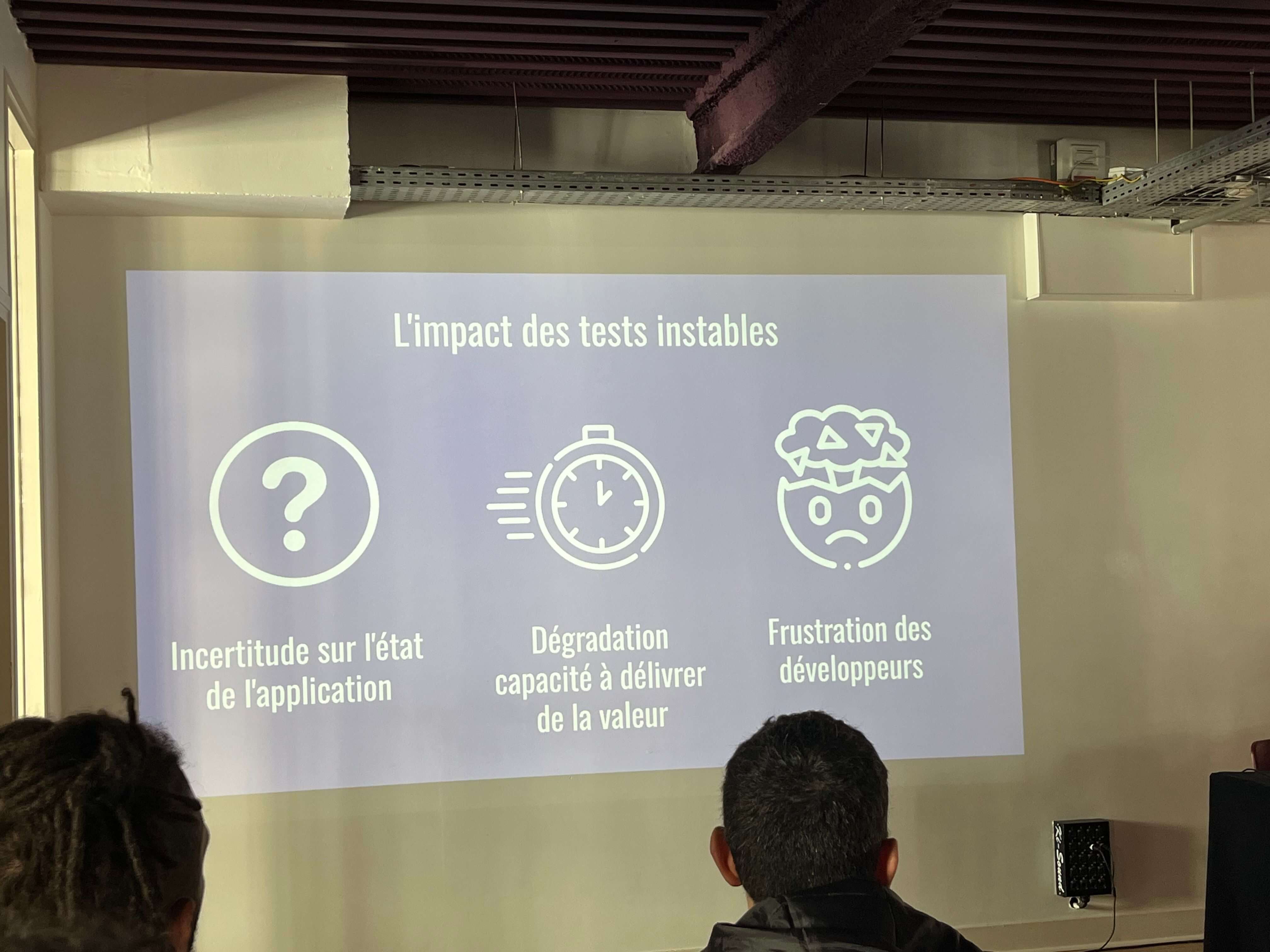
- Unstable tests lead to a considerable waste of time during debugging and failure analysis phases.
- They erode the team’s confidence in test results, which can lead to ignoring genuine problems.
- “Flakiness” tends to worsen with “copy-paste” testing practices or the habit of turning a blind eye to random failures.
Common Causes of Test Instability
- Poorly written tests, with complex logic or poorly managed dependencies.
- Use of hardcoded values that become obsolete over time.
- Omission of special cases or edge scenarios.
- Problems with resetting indexes or state variables.
- Dependence on unstable or non-reproducible input data.
- Timing (time-out) or synchronization issues.
Solutions and Best Practices
- Adopt a collective approach to resolve instability issues.
- Highlight the negative impact of “flakiness” to raise team awareness.
- Improve test development and maintenance practices.
- Implement rigorous code reviews for tests.
- Use tools to detect and analyze unstable tests.
Implementing a Process for Managing Unstable Tests
- Encourage the team to report unstable tests as soon as they are detected.
- Create specific tickets to document problems and track their resolution.
- Consider temporarily disabling unstable tests to avoid blocking delivery.
- Prioritize resolving instability issues.
Alternative Strategies
- If instability persists despite resolution efforts, it may be necessary to rethink the test strategy.
- Consider using other types of tests or alternative testing approaches.
Conclusion
Effective management of test instability is essential to ensure software quality and reliability. By adopting best practices and implementing a suitable process, teams can overcome this challenge and improve their ability to deliver high-quality products.
User-Centric QA, a test approach that listens to users (Camille Fournier)
Introduction
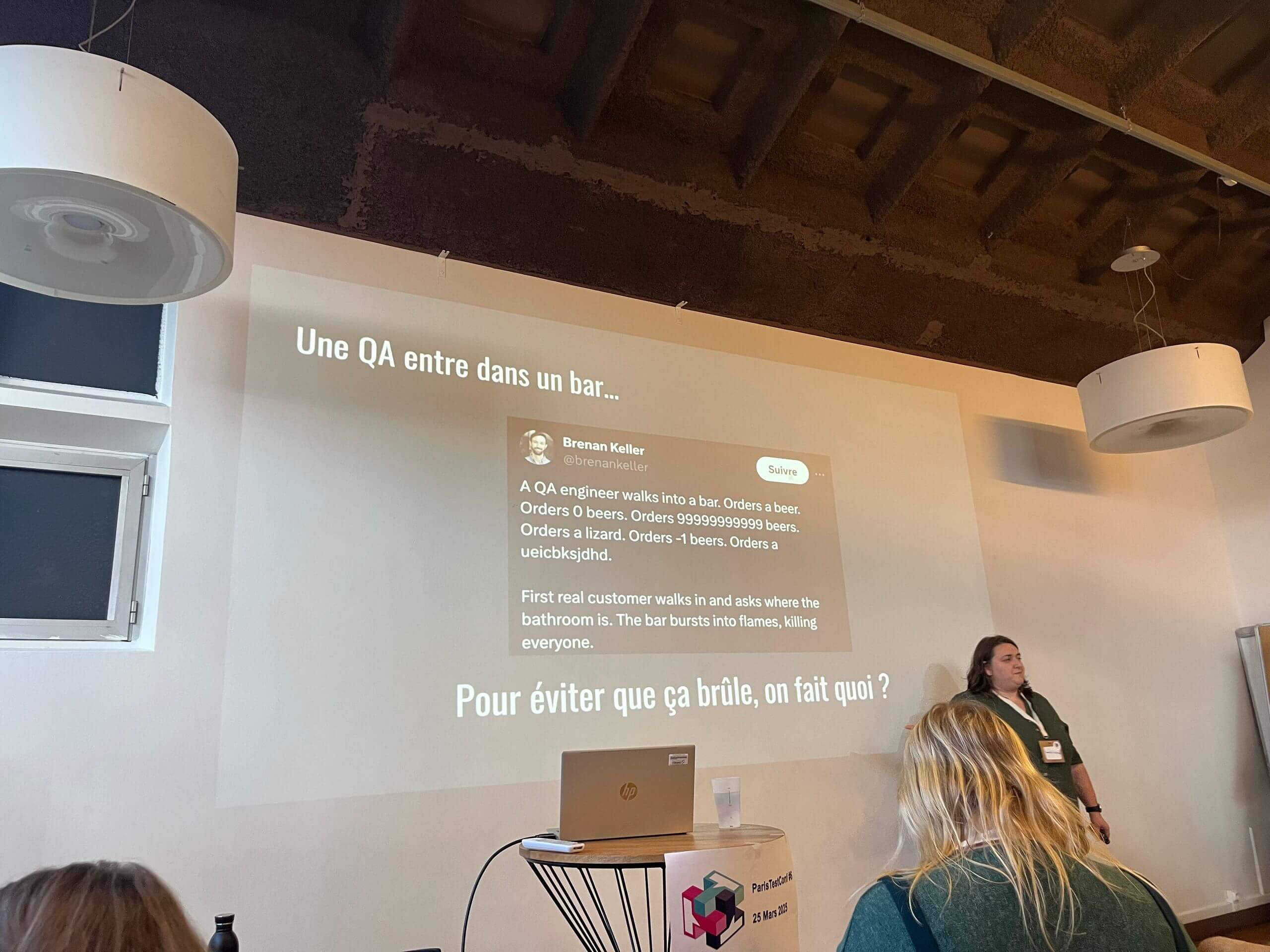
This conference, presented by Camille Fournier, suggests placing the user at the center of our quality assurance approaches.
Listening to the user to identify and understand usages
How?
- Dual listening with customer service.
- Capitalizing on user feedback.
- Using user verbatim in personas.
Avoiding cacophony:
- Not giving more credit to those who shout the loudest or complain to the right people.
- Taking a step back on context and seasonality.
Solution paths:
- Adopting a data-driven approach.
- Calling on experts.
What place for QA in the tech and product organization?
Doing quality assurance from the design stage to accelerate delivery:
- Mockup testing, user story reviews…
- Participating as an auditor in user research activities.
- Promoting QA/UX/Product transversality.
Avoiding having a role that is too vague:
- Not over-soliciting QA.
- Good positioning of QA.
Solution paths:
- Defining the limits of one’s role and adapting it to the context.
- Questioning and inquiring rather than asserting.
Adopting the right mindset in testing to get out of one’s biases
Showing empathy and thinking about the context of use.
- “Forgetting” what you know.
- Promoting exploratory testing methods.
Avoiding neglecting technical aspects:
- Not betting everything on the “visible” experience and always thinking about technical aspects.
- Not setting aside standards, norms, and compliance notions.
Solution paths:
- Combining different testing phases.
For what results?
- Adopting the right KPIs to move away from a vision centered on critical bugs or code coverage.
- Examples of KPIs to integrate:
- Criticality of bugs in production.
- Number of feedbacks (feature requests, improvement requests).
- NPS (Net Promoter Score).
- Developing a role as a user ambassador.
The keys to getting there
- Being and remaining attentive to users.
- Focusing on an organization that promotes quality transversality.
- Showing empathy in one’s testing approach.
Objective: Encourage and measure user satisfaction.
From incident to excellence: the role of post-mortems in quality (Benoit Maggi)
Introduction
Despite all the precautions taken, a production incident always ends up occurring. Once services are restored, an essential question remains: how to prevent this problem from happening again?
Why a Post-Mortem?
Following an incident, the post-mortem goes well beyond simple technical analysis: it aims to understand the root causes, identify collective actions, and continuously improve processes.
To do this, two artifacts:
- A document
- A meeting
Structuring the writing of a post-mortem document
The document is composed of 4 main parts:
The facts:
- Non-negotiable
- Factual
- Data-based
- Create a timeline (When - What)
- Prepare the relevant data (monitoring, CPU metrics, application logs, data…)
The analysis:
- Seek a cause-and-effect diagram to trace back as far as possible.
- List the factors that contributed to the incident.
- At the end of the analysis, determine the root cause (on which action can be taken, which can be worked on).
The actions:
- Post it / Tickets > Actions that will solve the problem (e.g., Fix, Automate, Tool, Inform, Test, add test typologies…)
The communication:
- Title, understandable by everyone.
- Description, summarizing the incident, the cause, the solution implemented.
- User impact.
- For internal teams (Quality & Customer Relations), management, product managers…)
Retrospective
Preparation:
- Someone must be designated as the lead to organize the post-mortem.
- Initialization of the document.
- Do not wait to talk about the incident, do the post-mortem as quickly as possible, while it is fresh in people’s minds (24/48h max).
- Contact the people who were on call during the incident.
- Contact the dev teams.
- Contact Quality and customer relations teams.
- Contact the management.
- Contact the product owners.
- Begin to complete the document before the meeting.
Animation:
- Participants are often unhappy, so start with an ice breaker or a round table to de-escalate tensions.
- Beware of finger pointing: this search for the culprit (Blameless culture) must be eliminated. This does not mean that we will not talk about people’s actions. We will talk about everything, but not about a culprit.
- Review the timeline: in an ideal world, everyone has already read/seen the timeline.
- Analysis: Asking why helps non-said things emerge. if possible, create an Ishikawa diagram, in order to have a cause and effect diagram.
Actions:
- Devs and QA are often on the wrong side of the stick : however, it is necessary to take advantage of it to raise the problems that no one wants to hear.
- Descriptions
- Impacts
Follow up:
- Actions in the dev + product teams.
- Description and impact (communication) for quality and customer relations teams.
- Participate in the continuous improvement process.
In order to capitalize on the lessons learned and transform incidents into opportunities to improve service quality, metrics can be checked and compared:
- Count the number of incidents.
- MTTR (mean time to restore).
- Change failure rate.
- Standard: SLA / SLO.
Conclusion: A Valuable Edition
Paris Test Conf 2025 offered a varied program and high-quality talks. The topics covered, ranging from automation and security to the integration of artificial intelligence, provided a comprehensive overview of the current challenges in software testing.
Several of the concepts and case studies presented were particularly relevant, and we will be looking into applying some of these approaches within our teams in the coming months.
The event confirmed its value as a key professional gathering for the testing community. We plan to return next year to keep up with the industry’s developments.